有玩 커뮤니티 최적화 과정 기록
5,142 0
아침에 有玩 커뮤니티의 제목 글자 수 제한을 조금 수정하고, 따로 기록용 글도 하나 작성했습니다. 그런데 지금 생각해 보니 앞으로 수정해야 할 것이 아직 많고, 수정할 때마다 글을 하나씩 작성한다면 효율이 높지 않을 뿐만 아니라 나중에 찾아보기도 불편할 것 같습니다.
그래서 이 글을 통해 수정한 파일을 계속 기록하기로 했으며, 필요한 분들이 참고하기에도 편리하도록 했습니다. 아래의 모든 수정 사항은 Discuz 3.4 버전을 기준으로 하며, 이전 버전이라면 코드 위치가 다를 수 있으니 이 글을 참고용으로만 봐 주세요.
단순히 기록을 위한 글이므로 자세하게 작성하지는 않을 예정입니다. 이해되지 않는 부분이 있는 분은 아래에 댓글을 남겨 주세요. 성실하게 답변해 드리겠습니다.
4、온라인 사용자 페이지 스타일 미세 조정
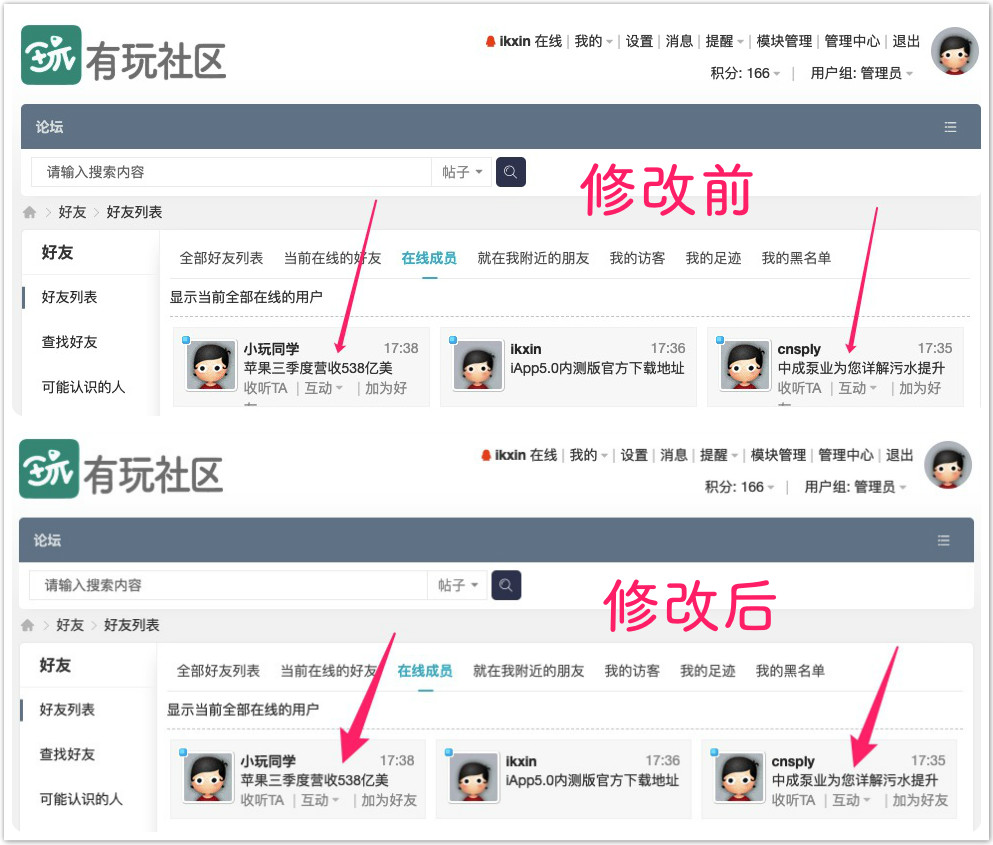
파일 경로 /template/default/home/space_friend.htm
205번째 줄
HTML HTML
<div class="xg1">
다음과 같이 변경
HTML HTML
<div class="xg1" style="white-space: nowrap;">
2019.07.31
3、이미지 팝업 첨부 파일 다운로드 취소
파일 경로 /template/default/forum/discuzcode.htm
258번째 줄
HTML HTML
<img{if $attach['price'] && $_G['forum_attachmentdown'] && $_G['uid'] != $attach['uid']} class="attprice"{/if} style="cursor:pointer" id="aimg_$attach[aid]" aid="$attach[aid]" src="{STATICURL}image/common/none.gif" onclick="zoom(this, this.getAttribute('zoomfile'), 0, 0, '{$_G[setting][showexif]}')" zoomfile="{if $attach[refcheck]}forum.php?mod=attachment{$is_archive}&aid=$aidencode&noupdate=yes¬humb=yes{else}{$attach[url]}$attach[attachment]{/if}" file="{if $attach[refcheck]}forum.php?mod=attachment{$is_archive}&aid=$aidencode{else}{$attach[url]}$attachthumb{/if}" inpost="1"{if $_GET['from'] != 'preview'} onmouseover="showMenu({'ctrlid':this.id,'pos':'12'})"{/if} />
다음과 같이 변경
HTML HTML
<img{if $attach['price'] && $_G['forum_attachmentdown'] && $_G['uid'] != $attach['uid']} class="attprice"{/if} style="cursor:pointer" id="aimg_$attach[aid]" aid="$attach[aid]" src="{STATICURL}image/common/none.gif" onclick="zoom(this, this.getAttribute('zoomfile'), 0, 0, '{$_G[setting][showexif]}')" zoomfile="{if $attach[refcheck]}forum.php?mod=attachment{$is_archive}&aid=$aidencode&noupdate=yes¬humb=yes{else}{$attach[url]}$attach[attachment]{/if}" file="{if $attach[refcheck]}forum.php?mod=attachment{$is_archive}&aid=$aidencode{else}{$attach[url]}$attachthumb{/if}" inpost="1"{if $_GET['from'] != 'preview'} {if $firstpost && $_G['fid'] && $_G['forum']['picstyle'] && ($_G['forum']['ismoderator'] || $_G['uid'] == $attach['uid'])}onmouseover="showMenu({'ctrlid':this.id,'pos':'12'})"{/if}{/if} />
260번째 줄
HTML HTML
<img{if $attach['price'] && $_G['forum_attachmentdown'] && $_G['uid'] != $attach['uid']} class="attprice"{/if} id="aimg_$attach[aid]" aid="$attach[aid]" src="{STATICURL}image/common/none.gif" zoomfile="{if $attach[refcheck]}forum.php?mod=attachment{$is_archive}&aid=$aidencode&noupdate=yes¬humb=yes{else}{$attach[url]}$attach[attachment]{/if}" file="{if $attach[refcheck]}forum.php?mod=attachment{$is_archive}&aid=$aidencode&noupdate=yes{else}{$attach[url]}$attach[attachment]{/if}" $widthcode id="aimg_$attach[aid]" inpost="1"{if $_GET['from'] != 'preview'} onmouseover="showMenu({'ctrlid':this.id,'pos':'12'})"{/if} />
다음과 같이 변경
HTML HTML
<img{if $attach['price'] && $_G['forum_attachmentdown'] && $_G['uid'] != $attach['uid']} class="attprice"{/if} id="aimg_$attach[aid]" aid="$attach[aid]" src="{STATICURL}image/common/none.gif" zoomfile="{if $attach[refcheck]}forum.php?mod=attachment{$is_archive}&aid=$aidencode&noupdate=yes¬humb=yes{else}{$attach[url]}$attach[attachment]{/if}" file="{if $attach[refcheck]}forum.php?mod=attachment{$is_archive}&aid=$aidencode&noupdate=yes{else}{$attach[url]}$attach[attachment]{/if}" $widthcode id="aimg_$attach[aid]" inpost="1"{if $_GET['from'] != 'preview'} {if $firstpost && $_G['fid'] && $_G['forum']['picstyle'] && ($_G['forum']['ismoderator'] || $_G['uid'] == $attach['uid'])}onmouseover="showMenu({'ctrlid':this.id,'pos':'12'})"{/if}{/if} />
267번째 줄 주석 처리
HTML HTML
<!-- <a href="forum.php?mod=attachment{$is_archive}&aid=$aidencode¬humb=yes" target="_blank">{lang download}</a> -->
2019.07.31
2、게시물 제목 글자 수 제한
파일 경로 /static/js/forum_post.js
JavaScript JavaScript
if(($('postsubmit').name != 'replysubmit' && !($('postsubmit').name == 'editsubmit' && !isfirstpost) && theform.subject.value == "") || !sortid && !special && trim(message) == "") {
    showError('抱歉,您尚未输入标题或内容');
    return false;
} else if(mb_strlen(theform.subject.value) > 80) {
    showError('您的标题超过 80 个字符的限制');
    return false;
}
아래에 삽입
JavaScript JavaScript
else if(mb_strlen(theform.subject.value) < 20 && mb_strlen(theform.subject.value) > 0) {
    showError('您的标题不足 20 个字符的限制');
    return false;
}
2019.07.30
1、제목의 Powered by Discuz! 제거
파일 경로 /template/default/common/header_common.htm
HTML HTML
<title><!--{if !empty($navtitle)}-->$navtitle - <!--{/if}--><!--{if empty($nobbname)}--> $_G['setting']['bbname'] - <!--{/if}--> Powered by Discuz!</title>
다음과 같이 변경
HTML HTML
<title><!--{if !empty($navtitle)}-->$navtitle - <!--{/if}--><!--{if empty($nobbname)}--> $_G['setting']['bbname']<!--{/if}--></title>
2019.07.16
댓글
(0)아직 댓글이 없습니다