「Caesium」A Local Batch Image Compression Tool Supporting Multiple Formats
4,952 0
Websites often need to display many images, but each image can be particularly large, taking up a lot of storage and consuming considerable bandwidth, which in turn increases server costs. This is when we need to use image compression technology. This technology can significantly reduce the amount of space occupied by images on your website.
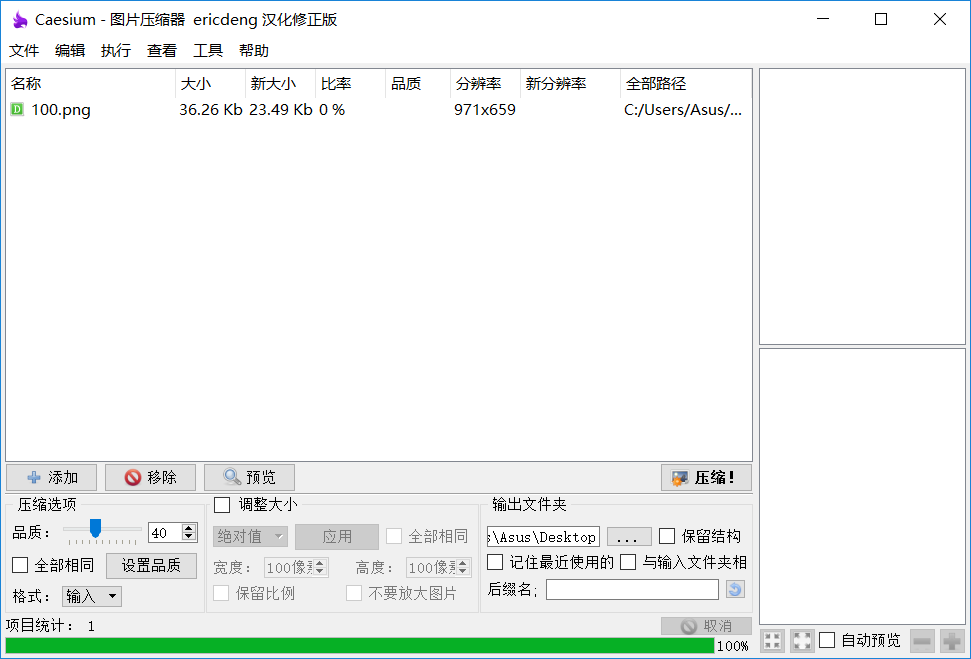
Today, I’m introducing an image compression tool called Caesium. Caesium is an extremely useful software for reducing image file sizes. It can reduce image sizes by 90% while preserving their original quality, and it also supports batch compression. During operation, you can preview the images before and after compression in real time, making it easy to compare them.
Software Screenshot
Features
- Uses intelligent compression algorithms, achieving image compression rates of up to 90%; supports batch image compression.
- Supports common image formats such as JPG, BMP, PNG, GIF, and WMF.
- Easy previewing with dual image display panels for conveniently comparing image quality before and after compression.
- Supports dual-pane compression levels, allowing you to set an individual compression level for each photo.
- Lets you customize image quality and compression levels; supports renaming file extensions.
Comments
(0)No comments yet. Start the conversation.