「Bandizip」A Versatile, Ad-Free Cross-Platform Compression Utility
As an essential piece of compression software for computers, I had always been using HaoZip from 2345. I used to think HaoZip was better than software such as WinRAR, 7Z, and KuaiZip, after all, many so-called cracked versions of WinRAR and similar software pose security risks.
I chose HaoZip because it was supported by 2345's official website, and used it happily for several years. However, HaoZip's recent updates made me feel disgusted: automatically popping up windows at startup, forcibly changing the browser's default homepage, and automatically installing updates in the background. All of these violate the user agreement, so I had no choice but to give up HaoZip and start looking for a replacement.
Bandizip

An exceptionally clean interface with no annoying ads. Compared with many other compression utilities, it also offers many user-friendly features.
I wonder whether the name of this software seems somewhat familiar to you.
The company that developed this software is called Bandisoft, a rather low-profile South Korean software company. It was the original developer of the well-known screen-recording software Bandicam (development was later taken over by Bandicam Company).
Main Features
- Supported operating systems: Windows Vista/7/8/10
- License: Freeware (EULA)
- Full-featured compression/decompression/browsing/editing application
- Extracts more than 30 formats, including: RAR/RAR5/7Z/ZIP
- Compresses archive files using passwords and multiple volumes
- Uses multiple cores for fast compression
Compression
- Supported formats: ZIP, 7Z (lzma2), ZIPX (xz), EXE (sfx), TAR, TGZ, LZH (lh7), ISO (joliet), GZ, XZ
- Modify ZIP files (add/delete/rename)
- Compress up to 6 times faster using multiple cores
- Create encrypted archive files
- Supports the AES256 encryption algorithm
- Supports compressing files larger than 4 GB
- Unicode or MBCS filenames in ZIP format
- Create multi-volume archives in ZIP/7z format
Decompression
- Supported formats: 7Z, ACE, AES, ALZ, ARJ, BH, BIN, BZ, BZ2, CAB, Compound (MSI), EGG, GZ, IMG, ISO, ISZ, LHA, LZ, LZH, LZMA, PMA, RAR, RAR5, SFX (EXE), TAR, TBZ, TBZ2, TGZ, TLZ, TXZ, UDF, WIM, XPI, XZ, Z, ZIP, ZIPX, ZPAQ
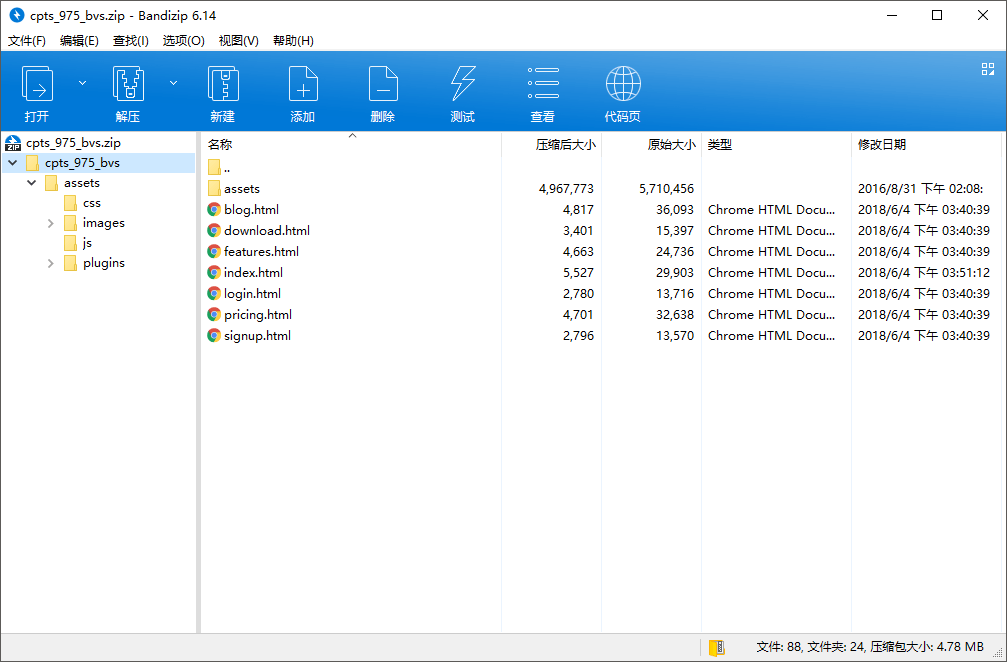
- Easily view archive file lists
- Extract only selected files; drag and drop is also supported
- Archive comments are available for ZIP and RAR formats
- Extract files in TGZ/TBZ formats in one step
Various Features
- Determine whether an archive is damaged by testing its file integrity
- Supports changing code pages
- Explorer shell integration and archive preview
Screenshots
Comments
(0)No comments yet. Start the conversation.