Beautifying the Reply Style of WordPress Notification Emails
Since setting up this site, I have never enabled comment-reply email notifications. The main reason is that WordPress’s built-in reply style is too basic, and sending emails via the SMTP protocol is not particularly stable either. Free QQ Mail accounts will be suspended after sending too many emails, so I eventually had to give up. Fortunately, today I saw hope on Liu Ronghuan’s blog. He had written an exceptionally good-looking email reply style, which I used directly. I will still use SMTP as the sending protocol for now and make do with it.
Features
The beautified WordPress email notification system includes the following features:
- Notify users when their comments are approved
- Notify users when their comments receive replies
- Notify administrators when a website backend login fails
- Notify users when their registered profile information is updated
- Notify users when their registered account is deleted by an administrator
- Notify users when the website publishes a new article
Demo Image
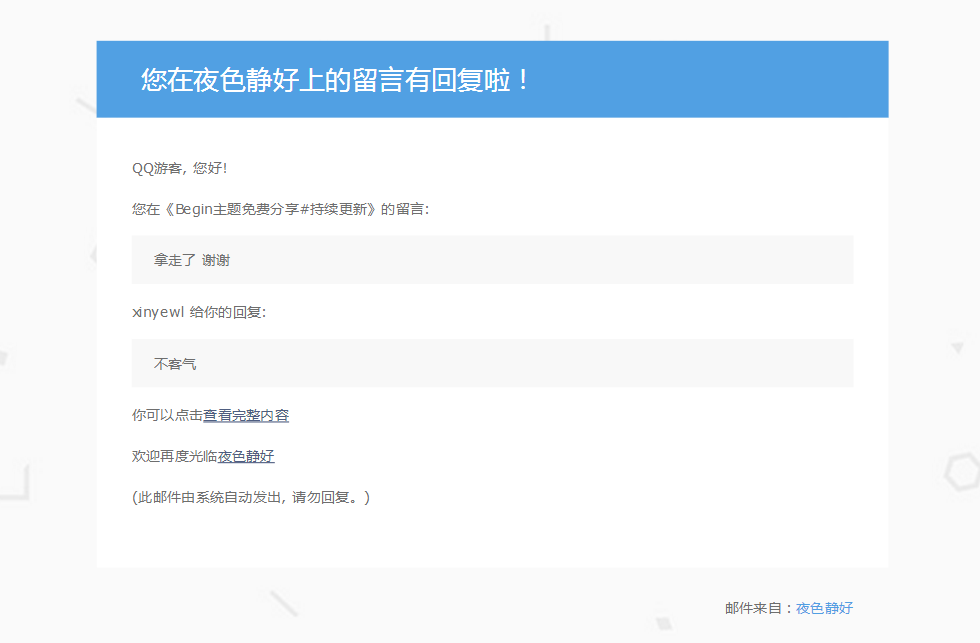
PHP Code
<?php
// 定义界面顶部区域内容,请注意修改您的主题目录
$email_bg = 'https://img.8b5.cn/2019/09/02/bea0e6a9d0497.jpg';
define('emailbg', $email_bg);
$email_headertop = '
    <div class="emailpaged" style="background-image: url(' . emailbg . ');-webkit-background-size: cover;-moz-background-size: cover;-o-background-size: cover;background-size: cover;background-position: center center;background-repeat: no-repeat;">
        <div class="emailcontent" style="width:100%;max-width:720px;text-align: left;margin: 0 auto;padding-top: 80px;padding-bottom: 20px">
            <div class="emailtitle">
                <h1 style="color:#fff;background: #51a0e3;line-height:70px;font-size:24px;font-weight:normal;padding-left:40px;margin:0">
';
define('emailheadertop', $email_headertop);
$email_headerbot = '
                </h1>
                <div class="emailtext" style="background:#fff;padding:20px 32px 40px;">
';
define('emailheaderbot', $email_headerbot);
// 定义界面底部区域内容,请注意修改下面广告图片地址
$email_footer = '
                <p style="color: #6e6e6e;font-size:13px;line-height:24px;">(此邮件由系统自动发出,请勿回复。)</p>
                </div>
                <div class="emailad" style="margin-top: 24px;">
                </div>
                <p style="color: #6e6e6e;font-size:13px;line-height:24px;text-align:right;padding:0 32px">邮件来自:<a href="' . get_bloginfo('url') . '" style="color:#51a0e3;text-decoration:none">' . get_option("blogname") . '</a></p>
            </div>
        </div>
    </div>
';
define('emailfooter', $email_footer);
// 修改网站默认发信人以及邮箱
function new_from_name($email){
    $wp_from_name = get_option('blogname');
    return $wp_from_name;
}
function new_from_email($email) {
    $wp_from_email = get_option('admin_email');
    return $wp_from_email;
}
add_filter('wp_mail_from_name', 'new_from_name');
add_filter('wp_mail_from', 'new_from_email');
// 评论通过通知评论者
add_action('comment_unapproved_to_approved', 'iwill_comment_approved');
function iwill_comment_approved($comment) {
  if(is_email($comment->comment_author_email)) {
    $post_link = get_permalink($comment->comment_post_ID);
    // 邮件标题,可自行更改
    $title = '您在 [' . get_option('blogname') . '] 的评论已通过审核';
    // 邮件内容,按需更改,如果不懂改,可以给我留言
    $body = emailheadertop.'留言审核通过通知'.emailheaderbot.'<p style="color: #6e6e6e;font-size:13px;line-height:24px;">您在' . get_option('blogname') . '《<a href="'.$post_link.'">'.get_the_title($comment->comment_post_ID).'</a>》发表的评论:</p>
            <p style="color: #6e6e6e;font-size:13px;line-height:24px;padding:10px 20px;background:#f8f8f8;margin:0px">'.$comment->comment_content.'</p>
            <p style="color: #6e6e6e;font-size:13px;line-height:24px;">已通过管理员审核并显示。<br />
            您可在此查看您的评论:<a href="'.get_comment_link( $comment->comment_ID ).'">前往查看</a></p>'.emailfooter;

    @wp_mail($comment->comment_author_email, $title, $body, "Content-Type: text/html; charset=UTF-8");
  }
}
// 邮件评论回复美化版
function comment_mail_notify($comment_id) {
    $admin_email = get_bloginfo ('admin_email');
    $comment = get_comment($comment_id);
    $comment_author_email = trim($comment->comment_author_email);
    $parent_id = $comment->comment_parent ? $comment->comment_parent : '';
    $to = $parent_id ? trim(get_comment($parent_id)->comment_author_email) : '';
    $spam_confirmed = $comment->comment_approved;
    if (($parent_id != '') && ($spam_confirmed != 'spam') && ($to != $admin_email)) {
    $wp_email = 'no-reply@' . preg_replace('#^www\.#', '', strtolower($_SERVER['SERVER_NAME']));
    $subject = '您在 [' . get_option("blogname") . '] 的留言有了新回复';
    $message = emailheadertop.'您在' . get_option("blogname") . '上的留言有回复啦!'.emailheaderbot.'
      <p style="color: #6e6e6e;font-size:13px;line-height:24px;">' . trim(get_comment($parent_id)->comment_author) . ', 您好!</p>
      <p style="color: #6e6e6e;font-size:13px;line-height:24px;">您在《' . get_the_title($comment->comment_post_ID) . '》的留言:<br />
      <p style="color: #6e6e6e;font-size:13px;line-height:24px;padding:10px 20px;background:#f8f8f8;margin:0px">'. trim(get_comment($parent_id)->comment_content) . '</p>
      <p style="color: #6e6e6e;font-size:13px;line-height:24px;">' . trim($comment->comment_author) . ' 给你的回复:<br />
      <p style="color: #6e6e6e;font-size:13px;line-height:24px;padding:10px 20px;background:#f8f8f8;margin:0px">'. trim($comment->comment_content) . '</p>
      <p style="color: #6e6e6e;font-size:13px;line-height:24px;">你可以点击<a href="' . htmlspecialchars(get_comment_link($parent_id, array('type' => 'comment'))) . '">查看完整内容</a></p>
      <p style="color: #6e6e6e;font-size:13px;line-height:24px;">欢迎再度光临<a href="' . get_option('home') . '">' . get_option('blogname') . '</a></p>
            '.emailfooter;
    $from = "From: \"" . get_option('blogname') . "\" <$wp_email>";
    $headers = "$from\nContent-Type: text/html; charset=" . get_option('blog_charset') . "\n";
    wp_mail( $to, $subject, $message, $headers );
    }
  }
  add_action('comment_post', 'comment_mail_notify');

// 博客后台登录失败时发送邮件通知管理员
function wp_login_failed_notify(){
    date_default_timezone_set('PRC');
    $admin_email = get_bloginfo('admin_email');
    $to = $admin_email;
    $subject = '【登录失败】有人使用了错误的用户名或密码登录' . get_bloginfo('name') . '!';
    $message =  emailheadertop . get_bloginfo('name') . '账户登录失败通知!'.emailheaderbot.'
            <div style="padding:0;font-weight:bold;color:#6e6e6e;font-size:16px">尊敬的管理员您好!</div>
            <p style="color: red;font-size:13px;line-height:24px;">' . get_bloginfo('name') . '有一条登录失败的记录产生,若登录操作不是您产生的,请及时注意网站安全!</p>
            <table cellpadding="0" cellspacing="0" border="0" style="width:100%;border-top:1px solid #eee;border-left:1px solid #eee;color:#6e6e6e;font-size:16px;font

-weight:normal">
                <thead><tr><th colspan="2" style="padding:10px 0;border-right:1px solid #eee;border-bottom:1px solid #eee;text-align:center;background:#f8f8f8;">失败信息如下</th></tr></thead>
                <tbody>
                    <tr>
                        <td style="padding:10px 0;border-right:1px solid #eee;border-bottom:1px solid #eee;text-align:center;width:100px">登录名</td>
                        <td style="padding:10px 20px 10px 30px;border-right:1px solid #eee;border-bottom:1px solid #eee;line-height:30px">' . $_POST['log'] . '</td>
                    </tr>
                    <tr>
                        <td style="padding:10px 0;border-right:1px solid #eee;border-bottom:1px solid #eee;text-align:center">尝试的密码</td>
                        <td style="padding:10px 20px 10px 30px;border-right:1px solid #eee;border-bottom:1px solid #eee;line-height:30px">' . $_POST['pwd'] . '</td>
                    </tr>
                    <tr>
                        <td style="padding:10px 0;border-right:1px solid #eee;border-bottom:1px solid #eee;text-align:center;">登录时间</td>
                        <td style="padding:10px 20px 10px 30px;border-right:1px solid #eee;border-bottom:1px solid #eee;line-height:30px">' . date("Y-m-d H:i:s") . '</td>
                    </tr>
                    <tr>
                        <td style="padding:10px 0;border-right:1px solid #eee;border-bottom:1px solid #eee;text-align:center;">登录IP</td>
                        <td style="padding:10px 20px 10px 30px;border-right:1px solid #eee;border-bottom:1px solid #eee;line-height:30px">' . $_SERVER['REMOTE_ADDR'] . '</td>
                    </tr>
                </tbody>
            </table>
            '.emailfooter;
    wp_mail( $to, $subject, $message, "Content-Type: text/html; charset=UTF-8" );
}
add_action('wp_login_failed', 'wp_login_failed_notify');
add_filter('logout_url', 'mk_logout_redirect_home', 10, 2);
function mk_logout_redirect_home($logouturl, $redir){
    $redir = home_url();
    return $logouturl . '&redirect_to=' . urlencode($redir);
}
function user_profile_update( $user_id ) {
        $site_url = get_bloginfo('wpurl');
        $site_name = get_bloginfo('wpname');
        $user_info = get_userdata( $user_id );
        $to = $user_info->user_email;
        $subject = "" . $site_name . "账户更新";
        $message = emailheadertop.'您在' . $site_name . '账户资料修改成功!'.emailheaderbot.'<p style="color: #6e6e6e;font-size:13px;line-height:24px;">亲爱的 ' . $user_info->display_name . '<br/>您的资料修改成功!<br/>谢谢您的光临</p>'.emailfooter;
        wp_mail( $to, $subject, $message, "Content-Type: text/html; charset=UTF-8");
}
add_action( 'profile_update', 'user_profile_update', 10, 2);
function iwilling_delete_user( $user_id ) {
    global $wpdb;
    $site_name = get_bloginfo('name');
    $user_obj = get_userdata( $user_id );
    $email = $user_obj->user_email;
    $subject = "帐号删除提示:" . $site_name . "";
    $message = emailheadertop.'您在' . $site_name . '的账户已被管理员删除!'.emailheaderbot.'<p style="color: #6e6e6e;font-size:13px;line-height:24px;">如果您对本次操作有什么异议,请联系管理员反馈!<br/>我们会在第一时间处理您反馈的问题.</p>'.emailfooter;
    wp_mail( $email, $subject, $message, "Content-Type: text/html; charset=UTF-8");
}
add_action( 'delete_user', 'iwilling_delete_user' );
function newPostNotify($post_ID) {
    if( wp_is_post_revision($post_ID) ) return;
    global $wpdb;
    $site_name = get_bloginfo('name');
    $post_contents = get_post($post_ID)->post_content;
    $get_post_info = get_post($post_ID);
    if ( $get_post_info->post_status == 'publish' && $_POST['original_post_status'] != 'publish' ) {
        $wp_user_email = $wpdb->get_col("SELECT DISTINCT user_email FROM $wpdb->users");
        $subject = 'Hi!' . $site_name . '发布新文章啦!';
        $message = emailheadertop . $site_name . '发布新文章啦!'.emailheaderbot.'
        <div style="padding:0;font-weight:bold;color:#6e6e6e;font-size:16px">文章标题:' . get_the_title($post_ID) . '</div>
        <p style="color: #6e6e6e;font-size:13px;line-height:24px;">' . mb_strimwidth($post_contents, 0, 320,"...") . '</p>
        <p style="color: #6e6e6e;font-size:13px;line-height:24px;text-align:right"><a href="' . get_permalink($post_ID) . '">查看全文</a><br /></p>
        '.emailfooter;
        $message_headers = "Content-Type: text/html; charset=\"utf-8\"\n";
        wp_mail($wp_user_email, $subject, $message, $message_headers);
    }
}
add_action('publish_post', 'newPostNotify');
?>
How to Use
General Themes
Place email.php in the theme directory, then add the following line to functions.php:
include_once('email.php');
Begin Theme
Open inc/function/notify.php in the theme directory. This contains the style written by Robin. Delete that file, rename email.php to notify.php, and upload it to replace Begin’s style.
Comments
(4)博主 链接失效了哦 ::aru:sweat::
我都找不到那个文件了
修改哪个为站长邮箱可以发送邮件啊,
不用修改啊,只需要配制好wp的mail能发邮件即可