Replace This Site’s Symantec Certificate with a Comodo Certificate
Some time ago, Namecheap launched a Symantec certificate replacement plan, allowing Symantec SSL certificates to be replaced with Comodo SSL certificates for free. Moreover, the new certificate is valid for three years, which seems like a great deal. Last month, I replaced the certificate for my www.ikxin.com with a Comodo certificate, and today I’m writing a detailed replacement tutorial for everyone.
Friendly Reminder:
The free DV SSL certificates currently offered by Alibaba Cloud, Tencent Cloud, West.cn, and others are issued by Symantec.
Steps
Prerequisites
- You have already applied for a Symantec SSL certificate, such as the free SSL certificates offered by Alibaba Cloud, Tencent Cloud, or West.cn.
- Register an account on the Namecheap official website.
Step One
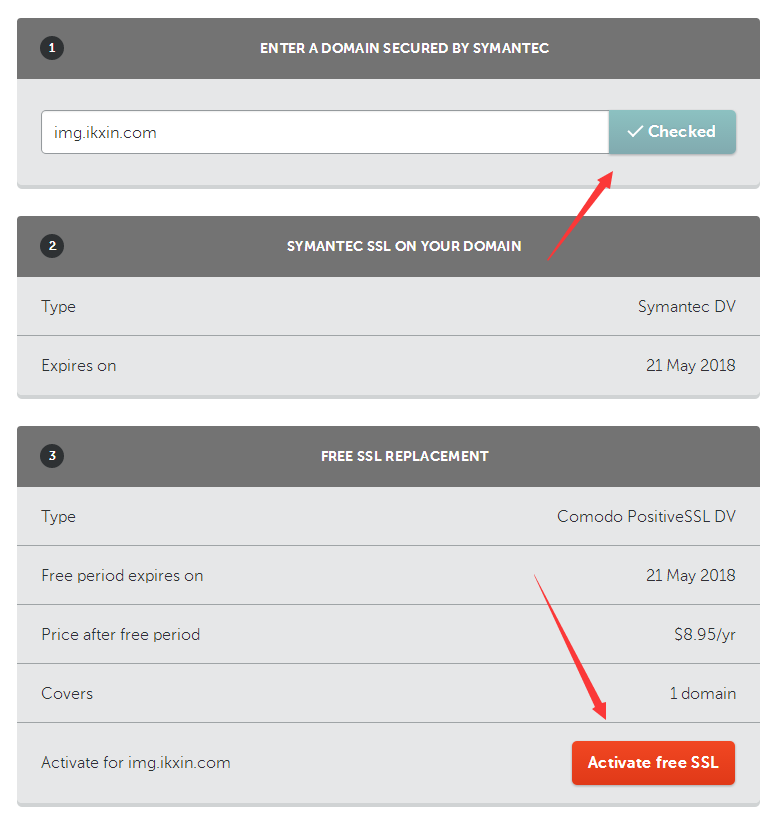
Visit the Namecheap Symantec Replacement page to check the website where you have already deployed a Symantec SSL certificate. This tutorial uses an image-hosting domain as an example. As shown in the image below, after the check passes, click Activate free SSL to continue to the next step.
Step Two
Use the online CSR generation tool ChinaSSL CSR Generator, as shown in the image below.

After generation, there will be two files: a CSR file and a KEY file. The CSR file is needed when applying for the certificate, while the KEY file is needed to deploy SSL after the application is approved. Be sure to save them securely.
Step Three
Return to Namecheap, submit the CSR file, click Next, and make the selections shown in the screenshot below.

Step Four
Verify the domain. You can choose HTTP file validation or DNS validation—choose whichever is more convenient. HTTP validation is used this time.

Step Five
Fill in the company information and other details. For required fields, you can simply enter the information in Pinyin (OPTIONAL fields can be left blank). At the bottom, you need to enter the email address where you want to receive the SSL certificate.

Step Six
Complete the HTTP authentication, then wait for the certificate to be sent to your email.
Comments
(0)No comments yet. Start the conversation.